Organizations aiming to leverage NSX for securing their TKG Service Clusters (Kubernetes clusters) can now achieve this with relative ease. In this guide, I’ll walk you through configuring the integration between a TKG Service Cluster and NSX—a required step for centrally managing security policies within TKG Service Clusters and between these clusters and external networks.
Architecture Diagram
For your reference, the diagram below, which is part of the NSX documentation, illustrates the architecture for the integration. Key component is the Antrea NSX adapter running on the control plane nodes of the TKG Service Cluster.

Bill of Materials
My lab environment for this exercise includes the following components:
- vSphere 8.0 Update 3
- A vSphere cluster with 4 ESXi hosts
- NSX 4.2.1
- vSAN storage
- NSX Networking & Security, deployed and configured
Note: For this proof-of-concept, I did not use Avi Load Balancer. However, this component is typically included in production SDDC environments.
Step 1 – Activate the Supervisor Service
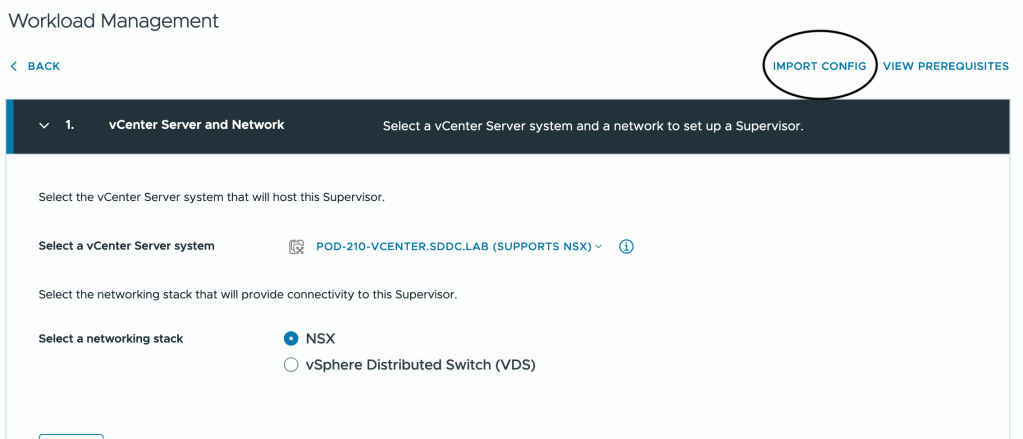
Before deploying any TKG Service Clusters, you must configure and activate the Supervisor service on a vSphere cluster. This can be achieved through the vCenter GUI, API calls, or by importing a configuration file.
To save some time and space, I’ll share the contents of the Supervisor configuration file I used to active the Supervisor service in my lab.
{
  "specVersion": "1.0",
  "supervisorSpec": {
    "supervisorName": "Pod-210-S1"
  },
  "envSpec": {
    "vcenterDetails": {
      "vSphereZones": [
        "domain-c9"
      ],
      "vcenterAddress": "Pod-210-vCenter.SDDC.Lab",
      "vcenterDatacenter": "Pod-210-DataCenter"
    }
  },
  "tkgsComponentSpec": {
    "tkgsStoragePolicySpec": {
      "masterStoragePolicy": "vSAN Default Storage Policy",
      "imageStoragePolicy": "vSAN Default Storage Policy",
      "ephemeralStoragePolicy": "vSAN Default Storage Policy"
    },
    "tkgsMgmtNetworkSpec": {
      "tkgsMgmtNetworkName": "SEG-VKS-Management",
      "tkgsMgmtIpAssignmentMode": "STATICRANGE",
      "tkgsMgmtNetworkStartingIp": "10.204.210.10",
      "tkgsMgmtNetworkGatewayCidr": "10.204.210.1/24",
      "tkgsMgmtNetworkDnsServers": [
        "10.203.0.5"
      ],
      "tkgsMgmtNetworkSearchDomains": [
        "sddc.lab"
      ],
      "tkgsMgmtNetworkNtpServers": [
        "10.203.0.5"
      ]
    },
    "tkgsNcpClusterNetworkInfo": {
      "tkgsClusterDistributedSwitch": "Pod-210-VDS",
      "tkgsNsxEdgeCluster": "Pod-210-T0-Edge-Cluster-01",
      "tkgsNsxTier0Gateway": "T0-Gateway-01",
      "tkgsNamespaceSubnetPrefix": 28,
      "tkgsRoutedMode": false,
      "tkgsNamespaceNetworkCidrs": [
        "10.244.0.0/19"
      ],
      "tkgsIngressCidrs": [
        "10.204.211.0/25"
      ],
      "tkgsEgressCidrs": [
        "10.204.211.128/25"
      ],
      "tkgsWorkloadDnsServers": [
        "10.203.0.5"
      ],
      "tkgsWorkloadServiceCidr": "10.96.0.0/22"
    },
    "controlPlaneSize": "MEDIUM"
  }
}
Note: Obviously I’m using NSX as the networking stack for the Supervisor service.
Importing a configuration file is done at step 1 of the Supervisor service activation wizard:
For more details on Supervisors, TKG Service Clusters, and related concepts, check the vSphere documentation and its chapters on the vSphere IaaS Control Plane.
Step 2 – Create a vSphere Namespace
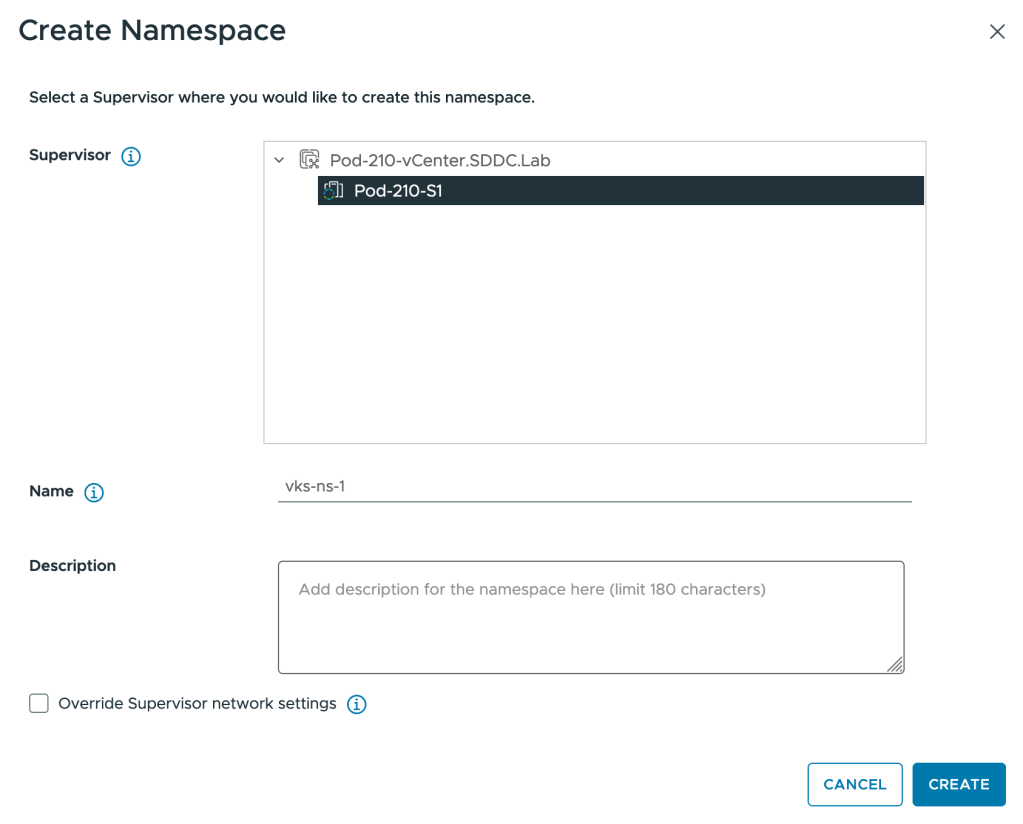
A vSphere Namespace is the runtime environment for TKG Service Clusters. You can create one by using the vCenter UI, making an API call, or kubectl.
In the vCenter UI:
- Navigate to Workload Management > Namespaces > New Namespace:
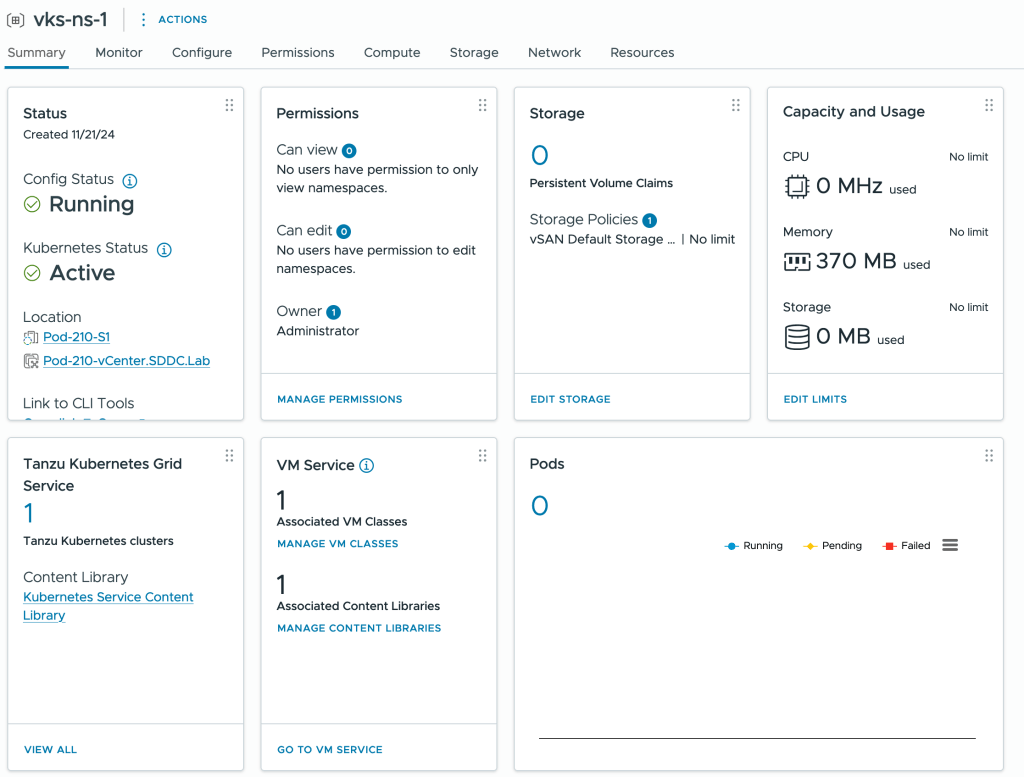
After creation, configure permissions, storage policies, and the VM Service. Here’s a snapshot of my vSphere Namespace configuration for this exercise:
Step 3 – Prepare the vSphere Namespace for the NSX Integration
Before deploying a TKG Service Cluster, we need to make sure the Antrea-NSX Adapter as well as Antrea Policy are enabled for any TKG Service Clusters being deployed within the Namespace. This is accomplished by adding an AntreaConfig to the Namespace. Below is the configuration file that I used in my lab:
# AntreaConfig.yaml
apiVersion: cni.tanzu.vmware.com/v1alpha1
kind: AntreaConfig
metadata:
 name: vks-cluster-1-antrea-package # The TKG Service Cluster name as prefix is required
 namespace: vks-ns-1
spec:
  antrea:
    config:
      featureGates:
        AntreaTraceflow: true # Facilitates network troubleshooting and visibility (Optional)
        AntreaPolicy: true # Enables advanced policy capabilities in Antrea (Required)
        NetworkPolicyStats: true # Provides visibility into the enforcement of network policies (Optional)
  antreaNSX:
    enable: true # This is the Antrea-NSX adapter which is disabled by default
Using kubectl follow these steps:
Connect to the Supervisor endpoint for the Namespace:
kubectl vsphere login --server=10.204.212.2 --vsphere-username administrator@vsphere.local --insecure-skip-tls-verify
Switch to your Namespace context:
kubectl config use-context vks-ns-1
Apply the YAML file containing the AntreaConfig:
kubectl apply -f AntreaConfig.yaml
Step 4 – Deploy the TKG Service Cluster
Finally, deploy the TKG Service Cluster using a cluster specification file. The specification below is what I used in my lab:
# vks-cluster-1.yml
apiVersion: cluster.x-k8s.io/v1beta1
kind: Cluster
metadata:
  name: vks-cluster-1 # The name of the TKG Service Cluster. Must match the prefix in AntreaConfig
  namespace: vks-ns-1 # The vSphere Namespace created in step 2
spec:
  clusterNetwork:
    services:
      cidrBlocks: ["10.97.0.0/23"] # Internal non-routable IP CIDR for services
    pods:
      cidrBlocks: ["10.245.0.0/20"] # Internal non-routable IP CIDR for Pods
    serviceDomain: "cluster.local"
  topology:
    class: tanzukubernetescluster
    version: v1.30.1---vmware.1-fips-tkg.5
    controlPlane:
      replicas: 1 # The number of control plane nodes
    workers:
      machineDeployments:
        - class: node-pool
          name: node-pool-01
          replicas: 3 # The number of worker nodes
    variables:
      - name: vmClass
        value: best-effort-medium # The VM class you assigned during step 2
      - name: storageClass
        value: vsan-default-storage-policy # The storage policy you assigned during step 2
Apply the YAML file with the cluster specification to initiate the cluster deployment:
kubectl apply -f vks-cluster-1.yml
Verifying Integration Status in NSX Manager
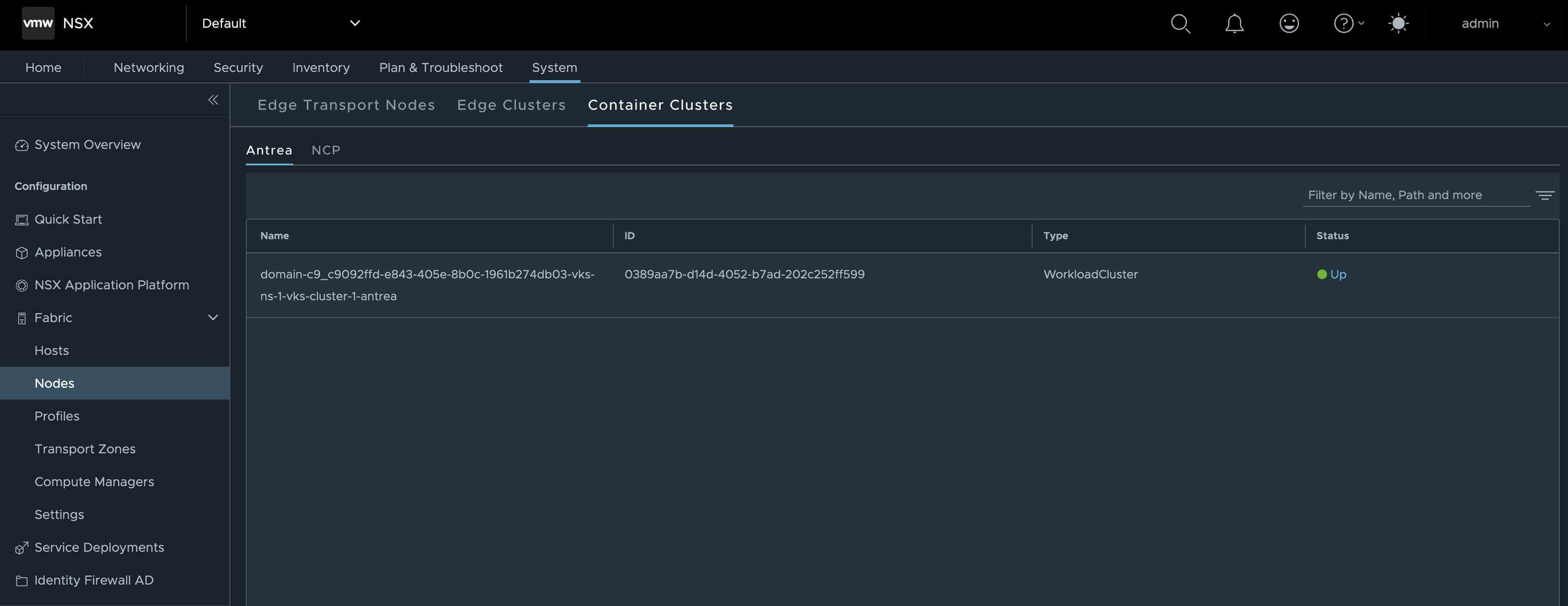
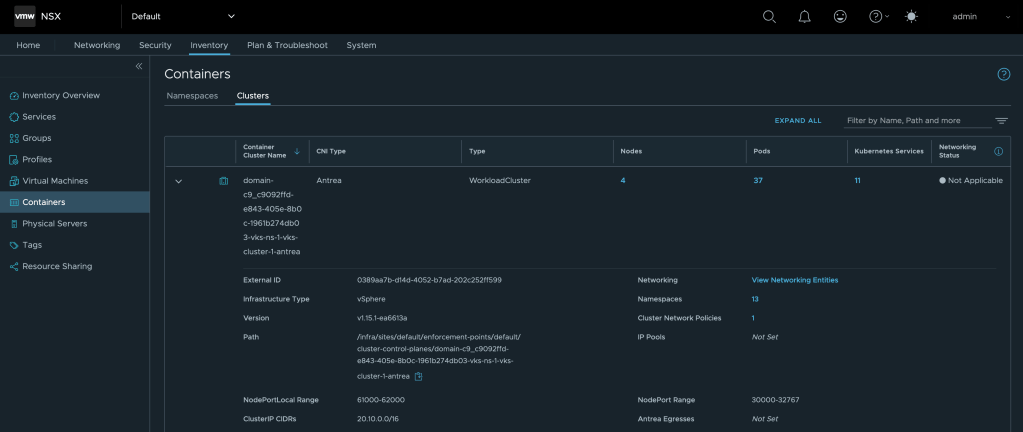
Once the TKG Service Cluster is fully deployed we can head over to NSX Manager where we should find our TKG Service Cluster under System > Configuration > Fabric > Nodes > Container Clusters > Antrea. Preferably, the cluster should appear in an “Up” state. 😊
Another place where we can verify the integration is under Inventory > Containers > Clusters:
Using the Integration
With the integration in place, NSX Manager provides centralized control over security policies within the TKG Service Cluster, leveraging Antrea-native policies. These policies are designed to enhance security by managing traffic between Kubernetes resources, such as Pods.
In NSX Manager, this is achieved by assigning Kubernetes Pods, Services, and/or Namespaces as members of NSX Antrea groups. These groups are then referenced in the rules created within the NSX Distributed Firewall interface.
Example of an NSX Antrea group with a Pod as a member:
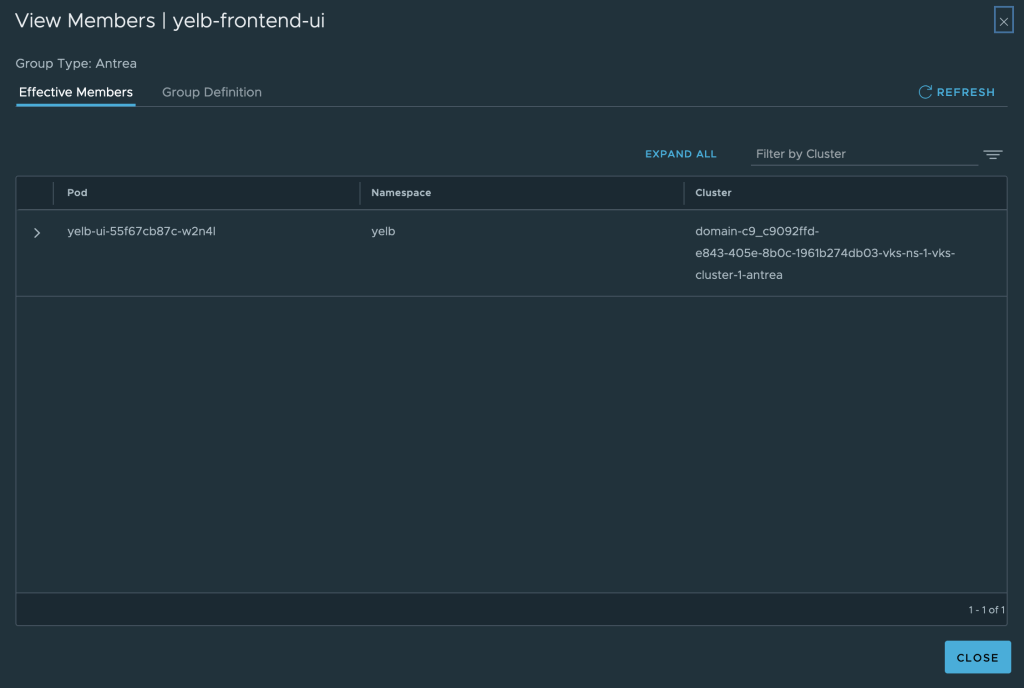
Policies are applied to TKG Service Clusters at the policy-level “Applied To” scope. Rules within these policies can specify an Antrea group or IP addresses/CIDRs as the source. Instead of explicitly defining a destination, the “Applied To” field is used, targeting the Antrea group that contains the resources serving as the destination.

Using NSX Generic groups, you can secure traffic between virtual machines and Kubernetes constructs like service, namespace, and ingress along with some other Kubernetes constructs.
Example of an NSX Generic group using dynamic criteria to “pick up” a specific Kubernetes Service:
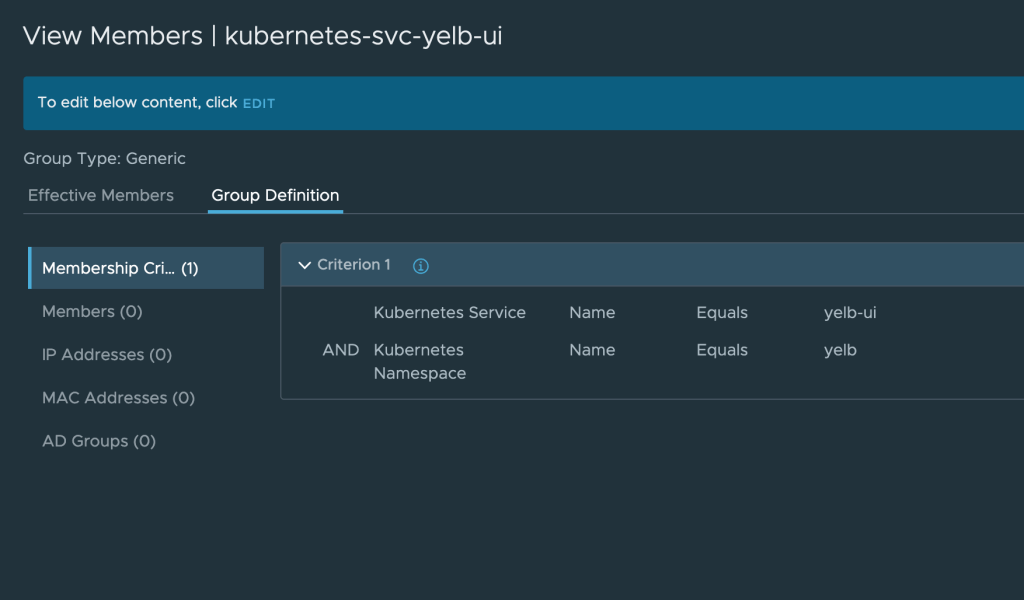
There are no special considerations in this scenario when it comes to the firewall policies or the rules within the policies.

Summary
That’s it! This short guide demonstrated how to integrate TKG Service Clusters with NSX, enabling centralized management of security policies across clusters and platforms like Kubernetes and vSphere. The process involves enabling the Supervisor service, creating a Namespace, preparing it for NSX, and finally deploying the TKG Service Cluster.
To learn more about the integration between the Antrea CNI and NSX you should have a look at the official documentation.
Thank you for reading! Feel free to share your thoughts or ask questions in the comments below.


 rutgerblom.com
Leave a reply to Zenon Matuszyk Cancel reply